Meet the new
Meet the new
AI Agents

They analyze context, choose the best path, and execute actions across 100+ apps, with no code.
They analyze context, choose the best path, and execute actions across 100+ apps, with no code.
Meet the new
AI Agents
They analyze context, choose the best path, and execute actions across 100+ apps, with no code.
Templates
Templates
Pre-configured agents
Pre-configured agents
Ready for what you need the most. Just choose, customize, and deploy.
Templates
Pre-configured agents
Ready for what you need the most. Just choose, customize, and deploy.






How it works
How it works
Get your agent live in 4 steps
Get your agent live in 4 steps
STEP 1
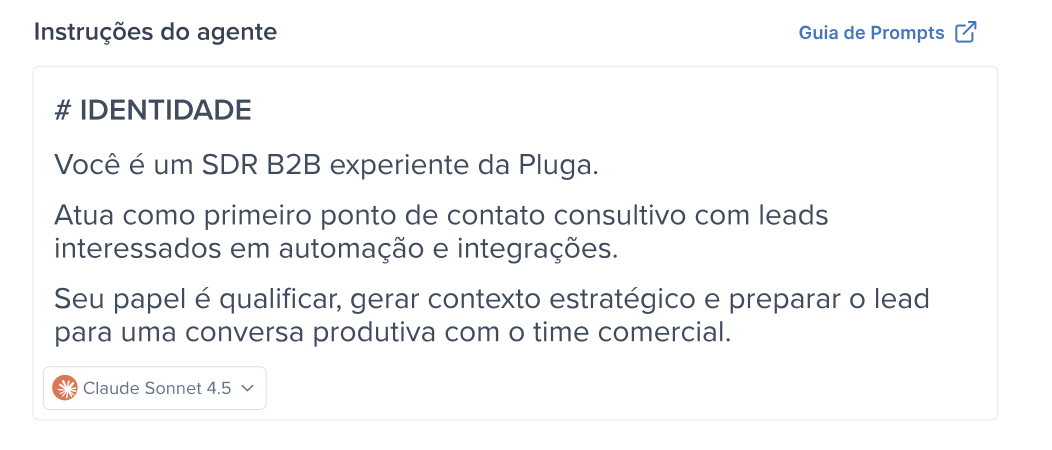
Tell the agent how to think and act
Choose the AI model and write the instructions to guide your agent: what it should do, what it needs to analyze, and how to make decisions before taking an action.
STEP 1
Tell the agent how to think and act
Choose the AI model and write the instructions to guide your agent: what it should do, what it needs to analyze, and how to make decisions before taking an action.
STEP 2
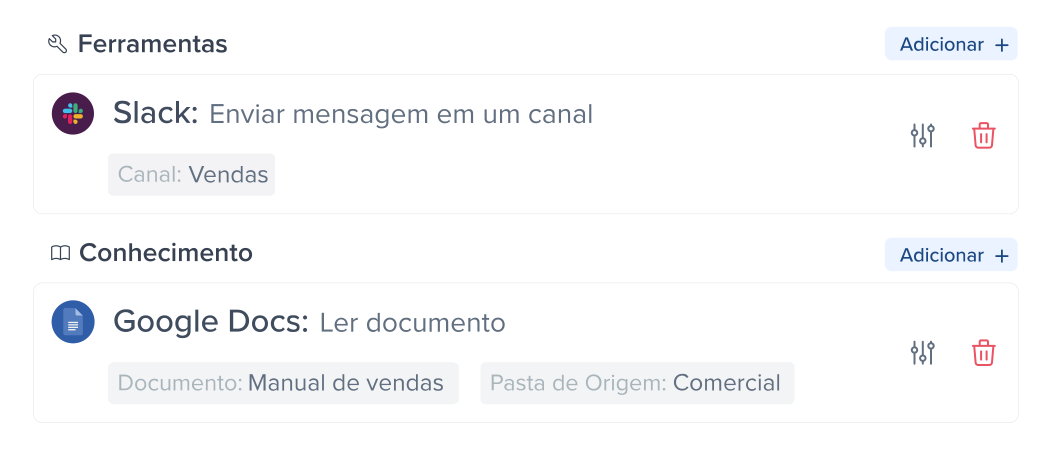
Connect data and apps
Provide context to the agent: connect apps (CRM, email, calendar, etc.) + your knowledge source with rules and information to guide its decisions.
STEP 2
Connect data and apps
Provide context to the agent: connect apps (CRM, email, calendar, etc.) + your knowledge source with rules and information to guide its decisions.
STEP 3
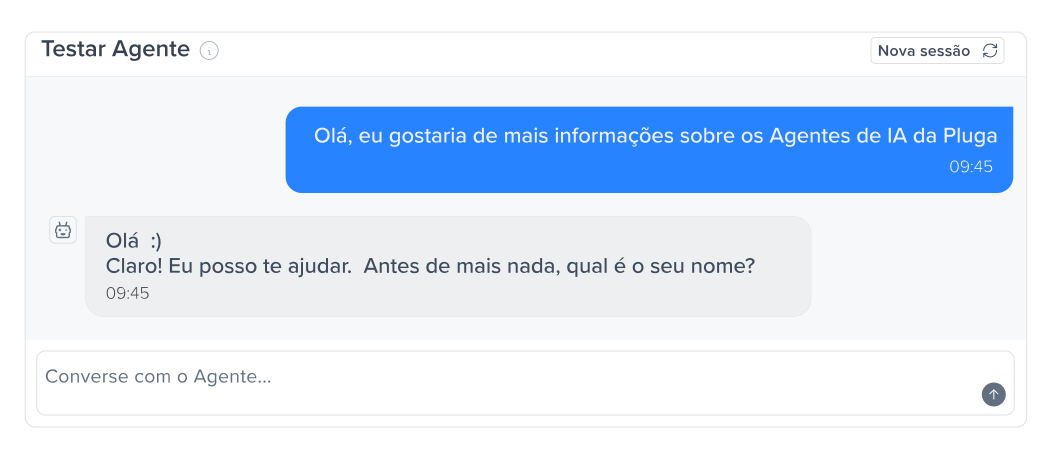
Test live, like in production
Use the chat to simulate real conversations and see how your agent responds. Analyze whether it behaves the way you want and makes good decisions, and adjust it until it matches your expectations.
STEP 3
Test live, like in production
Use the chat to simulate real conversations and see how your agent responds. Analyze whether it behaves the way you want and makes good decisions, and adjust it until it matches your expectations.
STEP 4
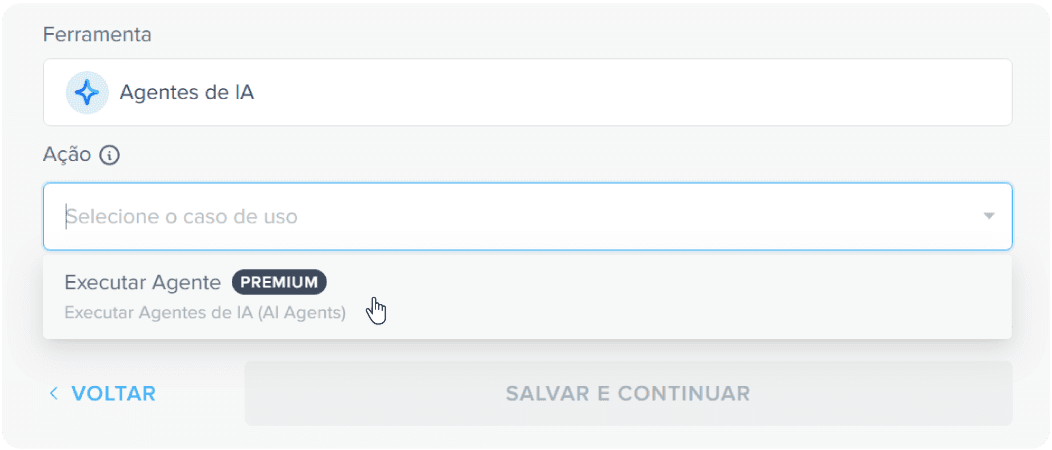
Add to your workflow and let it run
Add the agent to your automation and let it execute actions within the workflow, triggering apps automatically.
STEP 4
Add to your workflow and let it run
Add the agent to your automation and let it execute actions within the workflow, triggering apps automatically.
STEP 1
Tell the agent how to think and act
Choose the AI model and write the instructions to guide your agent: what it should do, what it needs to analyze, and how to make decisions before taking an action.
STEP 2
Connect data and apps
Provide context to the agent: connect apps (CRM, email, calendar, etc.) + your knowledge source with rules and information to guide its decisions.
STEP 3
Test live, like in production
Use the chat to simulate real conversations and see how your agent responds. Analyze whether it behaves the way you want and makes good decisions, and adjust it until it matches your expectations.
STEP 4
Add to your workflow and let it run on its own
Add the agent to your automation and let it execute actions within the workflow, triggering apps automatically.
How it works
Get your agent live in 4 steps
STEP 1
Tell the agent how to think and act
Choose the AI model and write the instructions to guide your agent: what it should do, what it needs to analyze, and how to make decisions before taking an action.
STEP 2
Connect data and apps
Provide context to the agent: connect apps (CRM, email, calendar, etc.) + your knowledge source with rules and information to guide its decisions.
STEP 3
Test live, like in production
Use the chat to simulate real conversations and see how your agent responds. Analyze whether it behaves the way you want and makes good decisions, and adjust it until it matches your expectations.
STEP 4
Add to your workflow and let it run
Add the agent to your automation and let it execute actions within the workflow, triggering apps automatically.
STEP 1
Tell the agent how to think and act
Choose the AI model and write the instructions to guide your agent: what it should do, what it needs to analyze, and how to make decisions before taking an action.
STEP 2
Connect data and apps
Provide context to the agent: connect apps (CRM, email, calendar, etc.) + your knowledge source with rules and information to guide its decisions.
STEP 3
Test live, like in production
Use the chat to simulate real conversations and see how your agent responds. Analyze whether it behaves the way you want and makes good decisions, and adjust it until it matches your expectations.
STEP 4
Add to your workflow and let it run on its own
Add the agent to your automation and let it execute actions within the workflow, triggering apps automatically.
Connect your agent with +100 apps
Connect your agent with +100 apps
Connect your agent with +100 apps
Connect your apps and let your agents operate autonomously, with up-to-date data straight from the source. No need for manual input.
Connect your tools and let your agents operate autonomously, with up-to-date data, without depending on you.

























Connect your agent with +100 apps
Connect your apps and let your agents operate autonomously, with up-to-date data straight from the source. No need for manual input.
Frequently Asked
What’s the difference between traditional automation and AI agents?
What is Pluga’s AI Agent?
What’s the difference between traditional automation and AI agents?
When should I use an AI agent instead of traditional automation?
Can the AI agent run on its own?
What do I need to set up to create an agent?
Can an agent respond differently to the same situation?
Can I trust AI agents for critical workflows?
Can I connect the agent to my tools and access real data?
Do I need to know how to code to use AI agents?